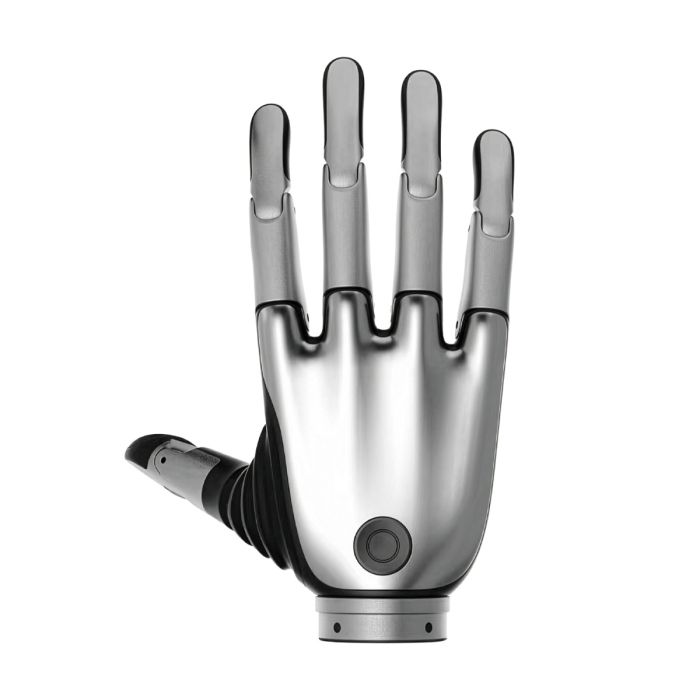
Brainco Revo 2 Touch Biomimetic Dexterous Left Hand (XTL)
In stock
- BRAND:
- BRAINCO
- MODEL:
- REVO 2 TOUCH (LEFT)
- PART #:
- XTL
- ORIGIN:
- China
- AVAILABILITY:
- SUBJECT TO AVAILABILITY
- SKU:
- BrainCo-Revo-2-Touch-Left
A left hand and a right hand are not simply mirror images once they sit inside a control cabinet: each needs its own address, its own calibration and its own place in the software. The Brainco Revo 2 Touch Biomimetic Dexterous Left Hand (XTL) is the left-hand member of the tactile version of BrainCo's second-generation bionic hand, and the published specification already settles that practical detail, giving the left hand a default device ID of 126.
Robots Middle East sells this hand and supplies it to customers across the Middle East. We also prepare the quotation, arrange delivery and customs with it, and support the project once the hand is in your laboratory or on your robot.
Background
BrainCo and the Revo 2 family
BrainCo is the manufacturer behind the Revo line of bionic hands. The Revo 2 is described in its published material as a bionic dexterous hand for robot integration and research. The family is sold in three versions, each in a left and a right configuration: Basic (XRL and XRR), Pro (XEL and XER) and Touch (XTL and XTR). The code letters identify both the version and the side, so the XTL on this page is the Touch version for the left side.
That naming matters in procurement. A project that begins with one hand often grows into a pair, and a pair is only useful if both sides share the same communication scheme and software. In the Revo 2 family the left hand carries the default ID 126 and the right hand carries 127, so the two can be told apart on a shared bus without extra configuration work at first power-up.
Where the Touch version sits
The Touch version is the tactile one. The source material names it the tactile version and groups it with the Pro version for its communication arrangements: both support three interfaces, namely RS485, CAN FD and EtherCAT, with the connector located below the wrist. For an integrator this is a useful detail, because it tells you where the cabling leaves the hand before any mechanical design is finished.
The hand is also described as offering closed-loop servo control and custom gesture definitions, together with protections for current, stall, high temperature and collision. These are the features that let a research team run repeated grasp trials without constantly worrying that a single faulty command will damage the mechanism.
Technical Specifications
| Specification | Value |
|---|---|
| Version code (Touch) | XTL (left) / XTR (right) |
| Active joints | 6, as published |
| Degrees of freedom | 11, as published |
| Thumb | Two active DoF (abduction and adduction) plus one passive flexion/extension DoF |
| Other four fingers | Each has one active and one passive flexion/extension DoF |
| Pinch force | ≥15N |
| Control precision | 0.1° |
| Communication interfaces | RS485, CAN FD, EtherCAT |
| Interface location | Below the wrist |
| Software support | SDK for Linux, Windows and ROS workflows |
| Default device ID (left hand) | 126 |
| Protections | Current, stall, high temperature, collision |
| Box contents, IP rating, cable length, fingertip force resolution, material | Not published by the manufacturer; confirmed at quotation |
Specifications as published by a single source; they are confirmed against the datasheet at quotation.
What makes the Touch version different from the Basic and Pro versions?
The most direct difference is the purpose of the hand. The Touch version is the tactile version of the family, so it is the one to consider when the question under study is contact itself: how a grasp forms, how it holds and how it changes. The fact sheet we hold does not publish the sensor type, the number of sensing points or the fingertip force resolution, so we do not claim them here. If tactile data is central to your project, ask us to confirm those details against the datasheet when we quote.
The Pro version shares the three communication interfaces and the below-the-wrist connector location with the Touch version, so the electrical integration is likely to look similar. The Basic version is listed in the same family under the codes XRL and XRR. The sources we hold do not set out a figure-by-figure comparison of all three, so we avoid attributing any number to a version other than the one on this page. Where a figure matters to your decision, we will verify it for the specific code at quotation.
What does the finger and thumb arrangement mean for grasping?
The published description counts 6 active joints and 11 degrees of freedom. The two numbers differ because some joints move passively. The thumb has two active degrees of freedom, for abduction and adduction, plus one passive degree of freedom for flexion and extension. Each of the other four fingers has one active and one passive degree of freedom for flexion and extension.
In practice, this is an underactuated design. A small number of motors can drive a hand with many articulations, which keeps control simpler than a fully actuated alternative while still allowing the fingers to conform around an object. The thumb's two active motions are what allow opposition, the movement on which most precision pinches depend. The published pinch force is at least 15N and the control precision is 0.1°, both reported in a single source and both confirmed at quotation.
Who is the Brainco Revo 2 Touch Left Hand for?
The principal buyers are university and corporate laboratories studying grasping, haptics and manipulation, where a tactile version gives them a reason to choose this hand over a plainer one. Humanoid robot developers are a second group: they need a compact hand with standard industrial buses and a software development kit that works with Linux, Windows and ROS, and the Revo 2 Touch is built around those requirements. Integrators building teleoperation or demonstration cells form a third group, valuing the custom gesture definitions and the protective functions.
If your work does not need tactile data, the Pro left hand (XEL) or the Basic left hand (XRL) may serve better, and we will gladly discuss the differences. For a matching right-hand unit, see the Touch right hand (XTR). You can also browse the wider BrainCo Revo 2 range or the Hands category.
What is the Brainco Revo 2 Touch Left Hand used for?
- Humanoid robot integration: fitted as the left end effector on a bipedal or wheeled humanoid platform.
- Grasping research: studying how contact develops during a grasp, using the tactile version of the hand.
- Haptics and manipulation experiments: testing control strategies with closed-loop servo control and custom gestures.
- Bimanual work: pairing the left hand with a right-hand unit for two-handed tasks in the laboratory.
- Teleoperation development: mapping an operator's hand gestures onto the robot hand through the SDK.
- Teaching and demonstration: showing students how multi-bus communication and protective functions work on a real hand.
Pricing and Availability
We do not publish prices on this page. Please request a quotation from Robots Middle East, stating the version code, the quantity and the intended application. Delivery, customs and support are arranged with the quotation, so you receive one coherent offer rather than separate arrangements. Everything we can confirm about this hand in advance is available on this page.
Frequently Asked Questions
Is this the left or the right hand?
This page covers the left hand, code XTL. The right-hand Touch version carries the code XTR and is a separate product.
Which communication interfaces does it support?
The published specification lists RS485, CAN FD and EtherCAT. The interface is located below the wrist.
Which software environments are supported?
BrainCo provides SDK support for Linux, Windows and ROS workflows, as reported in the published specification.
What is the default device ID?
For Revo 2, the default ID for the left hand is 126 and for the right hand 127, per the published specification.
What protections does the hand have?
It includes closed-loop servo control and custom gesture definitions, with protections for current, stall, high temperature and collision conditions, as reported by the manufacturer.
What is the IP rating, cable length or material?
The manufacturer has not published the IP rating, the cable length, the material, the fingertip force resolution or the box contents. We confirm them at quotation.
Where can I buy the Brainco Revo 2 Touch Left Hand and what does it cost?
You can buy it from Robots Middle East, which supplies customers across the Middle East. We give no price on the page; the cost is provided in a written quotation on request.
Summary
Left and right, tactile and plain: the choices around a robot hand are made in the details, and the Revo 2 Touch left hand answers them with a clear identity. It is the tactile version, it has a thumb with two active motions, it offers three industrial communication interfaces and it comes with an SDK for Linux, Windows and ROS. Where the manufacturer has not published a detail, we say so and verify it before you commit. When you are ready to specify the XTL for your project, this page is the starting point.
Specifications
| MODEL | REVO 2 TOUCH (LEFT) |
|---|---|
| PART # | XTL |
| ROBOT TYPE | HAND |
| ROBOT USE | EDUCATION, MEDICAL |
| TOTAL DOF | 11 DOF |
| SINGLE HAND LOAD | 20 KG |
| ACTIVE JOINTS | 6 |
| CONNECTIVITY | CANFD, ETHERCAT, RS485 |
| SECONDARY DEVELOPMENT | SUPPORTED |
| MAXIMUM PAYLOAD | 20 KG (44.1 LBS) |
| GRIPPING FORCE | ≥ 50N |
| PINCHING FORCE | ≥ 15N |
| POSITIONING ACCURACY | 0.1 DEGREES |
| VOLTAGE | 12-64V |
| BRAND | BRAINCO |
| ROBOT ACCESSORY TYPE | ROBOT HAND |
| LENGTH | 160 mm |
| WIDTH | 76 mm |
| WEIGHT | 383 grams |
What's included
Videos