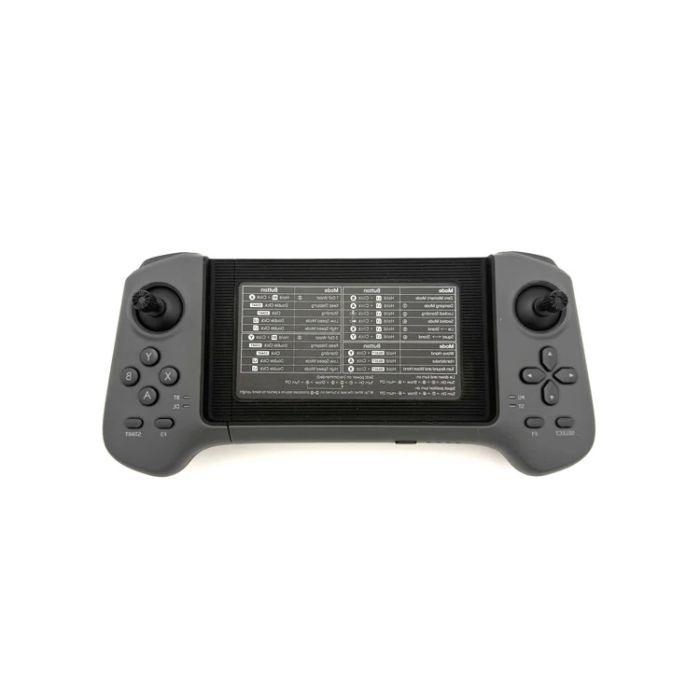
Unitree G1 Two-Handed Remote Controller (G1-RCONTROLLER)
In stock
- BRAND:
- UNITREE ROBOTICS
- PART #:
- G1-RCONTROLLER
- ORIGIN:
- China
- AVAILABILITY:
- SUBJECT TO AVAILABILITY
- SKU:
- Unitree-G1-RCONTROLLER
Unitree G1 Two-Handed Remote Controller (G1-RCONTROLLER)
Picture a Unitree G1 humanoid on an exhibition stand in a busy hall, or crossing a paved courtyard during an outdoor demonstration. The audience watches the robot, while the person in charge of it stands well back, often unnoticed. Everything that person needs to do — start a walk, correct a heading, settle the robot into a stance — has to pass through a handheld device. The Unitree G1 Two-Handed Remote Controller (G1-RCONTROLLER) is that device: the official dual-stick remote that Unitree provides for direct, low-latency control of the G1, built so the operator can keep a comfortable distance and still remain fully in command.
Robots Middle East supplies the Unitree G1 Two-Handed Remote Controller (G1-RCONTROLLER) to universities, research laboratories, integrators, exhibition organisers and corporate innovation teams across the Middle East. Robots Middle East prepares each quotation, arranges delivery to your site and provides after-sales support, whether the controller is ordered as a spare, as a replacement or alongside other G1 equipment.
Background
Unitree Robotics and the G1 family
Unitree Robotics built its reputation on agile legged robots, first with quadrupeds and then with humanoid platforms intended for research, education and applied development. The G1 is the company's compact humanoid, and the family includes several versions: G1 EDU, G1 Air and G1 Pro. Across that family, Unitree supplies a set of official accessories, such as dexterous hands and operator controllers, so that owners can extend or maintain their robots with parts designed for the platform. The G1 Two-Handed Remote Controller sits in the controllers part of that range, which you can browse in our Controllers category.
Two hands, two sticks, two links
The design follows a simple idea: a humanoid has to be steered and posed at the same time, and a two-handed, dual-stick layout lets the operator divide those tasks naturally between the thumbs. The layout is designed for natural, precise control of G1 locomotion and posture. Underneath that layout the controller combines two communication methods — a digital transmission module and Bluetooth — operating at 2.4 GHz. Power is replenished through a standard USB input, so the controller can be charged from the kind of supply that is already found in most laboratories, offices and exhibition stands.
Technical Specifications
| Specification | Value |
|---|---|
| Product type | Official dual-stick remote for direct, low-latency control of the Unitree G1 humanoid robot |
| Works with | Unitree G1 humanoid robot |
| Layout | Two-handed ergonomic, dual-stick design for G1 locomotion and posture control |
| Frequency | 2.4 GHz |
| Communication modes | Digital transmission module + Bluetooth |
| Remote control distance | 100m+ in open environments |
| Running time | 4.5 hours |
| Charging | USB charging |
| Charging voltage | 5V |
| Charging current | 2A |
Specifications are as published by the manufacturer and are confirmed against the datasheet at quotation. Unitree has not published the dimensions, weight, battery capacity, box contents, button layout, IP rating or operating temperature of this controller; Robots Middle East confirms these details with you at quotation.
Why use a dedicated remote rather than a laptop or tablet?
A great deal of G1 work happens through software: scripts, development interfaces and remote sessions over a network. These tools are excellent for programming behaviour, yet they are less suited to the moments when a person simply needs to move the robot, quickly and by hand. A laptop occupies both hands and draws attention towards a screen; the G1 Two-Handed Remote Controller places movement and posture under the thumbs, leaving the operator free to watch the robot and its surroundings.
The controller gives direct, low-latency control, which is precisely what matters when an operator is steering a walking humanoid through a room with people, furniture and cables. Because it is the official remote for the G1, it is designed for the robot's own control scheme rather than being adapted from a generic gamepad. For teams that also run autonomous or programmed routines, the remote serves as the dependable manual layer — the means of taking the robot to its starting point, repositioning it between trials and bringing it to a stable pose when a session ends.
How far can you operate the G1, and for how long?
Two figures shape how the controller fits into a working day. The first is range: the remote control distance is 100m+ in open environments. In practice, that open-field figure is a useful reference for courtyards, outdoor demonstration areas and large halls; indoor walls, metal structures and crowded radio environments will naturally affect what any 2.4 GHz link achieves, so it is sensible to rehearse in the actual venue before an important event.
The second is endurance. The controller's running time is 4.5 hours, which covers a typical laboratory session or a substantial portion of an exhibition day. Recharging uses USB at 5V and 2A, so a power bank or a standard USB charger can top the controller up during breaks. Teams that operate the G1 continuously across long event days often keep a second controller charged and ready, which is one of the most common reasons for ordering this item separately from the robot.
Who is the Unitree G1 Two-Handed Remote Controller for?
The first group is existing G1 owners: universities, research institutes and corporate laboratories that need a replacement after loss or damage, or an additional unit so that more than one operator can be trained. The second is event and exhibition teams, for whom a reliable manual controller and a spare are essential when a humanoid appears before an audience. The third is system integrators and solution providers who prepare G1 robots for clients and want an official controller for commissioning, testing and handover.
Educators form a further segment. In teaching environments, a familiar dual-stick controller lowers the barrier for students taking their first steps with a humanoid robot, before they progress to programmed control. Because the G1 comes in EDU, Air and Pro versions, we recommend stating which version you operate when you request a quotation, so that Robots Middle East can confirm the match for your robot.
If your fleet includes other Unitree humanoids, the correct controller differs: owners of an H2 should look at the Unitree H2 Remote Controller, and owners of an R1 at the Unitree R1 Remote Controller. For hands and other add-ons for the G1, our Humanoid Accessories category gathers the related items.
What is the Unitree G1 Two-Handed Remote Controller used for?
- Manual locomotion: walking the G1 between work areas, around obstacles and into position for a task.
- Posture control: settling the robot into a stance for photography, filming or a fixed demonstration.
- Live demonstrations: guiding the robot before an audience at exhibitions, open days and product launches.
- Teaching and training: giving students and new operators a direct, hands-on introduction to humanoid movement.
- Research sessions: repositioning the robot between experimental trials without stopping to rewrite code.
- Commissioning and handover: testing a G1 on site and showing a client's staff how to operate it.
Pricing and Availability
Robots Middle East supplies the Unitree G1 Two-Handed Remote Controller (G1-RCONTROLLER) by quotation, which allows us to confirm the correct item for your G1 version and to combine it with any other equipment you require. Delivery, customs and after-sales support are arranged together with your quotation. Tell us your organisation, your G1 version and the quantity you need, and a personalised quotation is available on this page.
Frequently Asked Questions
Is this the official controller for the Unitree G1?
Yes. It is the official dual-stick remote from Unitree for direct, low-latency control of the G1 humanoid robot.
How does the controller communicate with the robot?
It operates at 2.4 GHz and combines a digital transmission module with Bluetooth.
What is the control range?
The remote control distance is 100m+ in open environments. Indoors, walls and radio interference may reduce the range, so we advise testing in your own venue.
How long does it run on a charge?
The running time is 4.5 hours. It charges over USB at 5V and 2A.
Which G1 versions does it work with?
The controller works with the Unitree G1 humanoid robot, which comes in G1 EDU, G1 Air and G1 Pro versions. Please state your version when you request a quotation so that Robots Middle East can confirm the match.
Are the weight, dimensions and box contents available?
Robots Middle East confirms the weight, dimensions and box contents at quotation, together with the battery capacity, button layout, IP rating and operating temperature.
Where can I buy the Unitree G1 Two-Handed Remote Controller (G1-RCONTROLLER) and what does it cost?
You can order it from Robots Middle East, which supplies it across the Middle East. The cost depends on your configuration and delivery, so please request a quotation on this page.
Summary
On the exhibition floor or in the laboratory, the G1 is what everyone sees, but the person standing back with the controller decides how confidently it moves. The Unitree G1 Two-Handed Remote Controller (G1-RCONTROLLER) gives that person an official dual-stick interface for locomotion and posture, a 2.4 GHz link that combines a digital transmission module with Bluetooth, a running time suited to long sessions and simple USB charging. Whether you need a spare for events, a replacement for your laboratory or an additional unit for training, Robots Middle East will confirm the details and arrange supply — this page is the starting point.
Specifications
General
What's included
Related Products
Out of stock